Update 17.06.2026: Return requests formular - auto translate

Modified on Thu, 23 Jul at 1:58 PM

Automatic language detection for the Return Form

For multilingual stores, xConnector can automatically translate the Return Form widget based on the customer’s browser language.

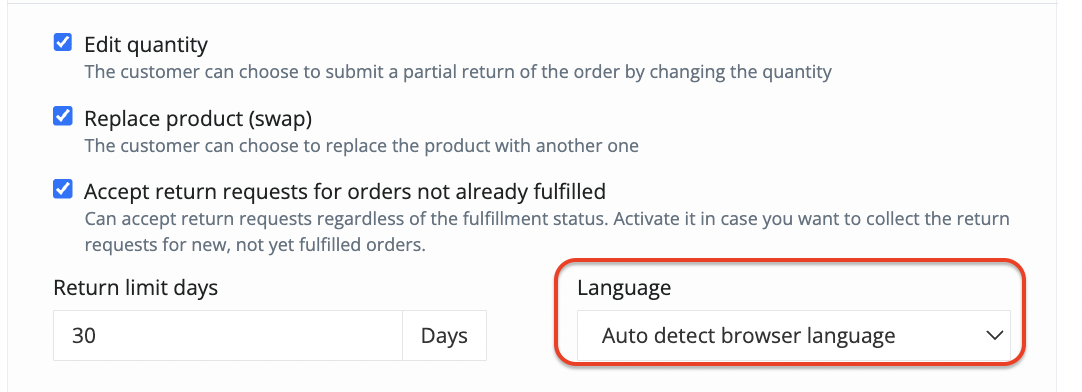
In the Return Form settings, go to Language and select:

Auto detect browser language


When this option is enabled, the widget is displayed in the language detected from the customer’s browser, provided that the language is supported.


Examples:

  • If the browser language is English, the Return Form is displayed in English.
  • If the browser language is Romanian, the Return Form is displayed in Romanian.
  • If the browser language is German, the Return Form is displayed in German.


The Return Form currently supports the following languages:

  • English
  • German
  • Romanian
  • Bulgarian
  • Hungarian
  • Slovak
  • Croatian
  • Czech
  • Slovenian
  • Italian
  • French
  • Spanish
  • Polish

You can also select a specific language from the dropdown. In this case, the Return Form will always be displayed in the selected language, regardless of the customer’s browser language.


Contact


➡️ Need help with xConnector? We are just a message away:


Chat: click the blue chat icon (bottom-right)
E-mail: support@xconnector.app
Phone: +4 0373 747 991


➡️ Stay connected with xConnector:


Facebook group: https://www.facebook.com/groups/shopify.romania.xconnector
Facebook page: https://www.facebook.com/xConnectorApp
TikTok: https://www.tiktok.com/@xconnector.app
YouTube: https://www.youtube.com/@xconnector_app


Was this article helpful?

That’s Great!

Thank you for your feedback

Sorry! We couldn't be helpful

Thank you for your feedback

Let us know how can we improve this article!

Select at least one of the reasons

Feedback sent

We appreciate your effort and will try to fix the article