Automatically cancel refused orders using tracking status
 Important Notice
Attention! This method involves risk and should be used with caution.
There are situations in which a parcel is marked by the courier as Refused, but may still be delivered to the customer at a later stage. If the courier marks the parcel as Refused, the order will be automatically canceled immediately by this flow.
There is also a risk that the parcel may not be physically returned to
your warehouse. Therefore, it is essential to verify whether the parcel actually arrives back at your store.
Please consider using this flow with caution!
Recommended approach
Our recommendation is to scan the refused parcel and use that moment to trigger the automatic order cancellation and invoice reversal. At that point, it is clear that the parcel has been received back at your warehouse:
In cases where orders are refused or returned, you can automatically cancel the order based on the tracking status received from the courier.
xConnector periodically retrieves and updates the tracking status for all orders, several times a day.
When the tracking status becomes Refused or Returned, an automation flow is triggered that automatically cancels the order.
If, in xConnector, you have also enabled the option to revert the invoice when an order is canceled, the invoice reversal will be triggered automatically together with the order cancellation.
You can enable this option here:
xConnector → Profile → Preferences → Automation → Revert invoice on cancel order
Shopify Flow setup
To automatically cancel orders when the tracking status is updated to Returned / Refused, you need to import and activate the attached Shopify Flow.
Please follow these steps:
- Go to Shopify → Apps → Flow
- Import the flow
- Activate it
For each activated flow, we recommend initially checking a few example orders to ensure everything works as expected.
You can customize this flow as you wish. These checkboxes are optional.
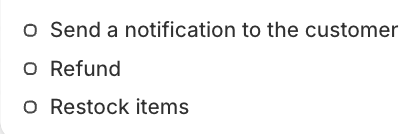
The action is Cancel order, and the trigger for reversing the invoice can be enabled in xConnector > Profile > Preferences > Automation.
If you prefer, you can also replace the action directly with Revert invoice, without cancelling the order first.
The advantage is that you no longer need to manually cancel refused orders.

The disadvantage is that you do not have control over whether the refused parcels have been returned before the orders are canceled.
------------------------------------------------------------------------------------------------------------
Other methods for canceling an order
Orders can also be canceled using the following methods:
- By scanning the shipping label
- Manually, directly from Shopify
The advantage is that you have full control over canceled orders. You can make sure the parcel has been returned before canceling the order.


The disadvantage is that you need to follow the procedure individually for each parcel.
Feel free to contact us if you need any further information:
Chat: click on the blue chat icon (bottom-right)
E-mail: support@xconnector.app
Phone: +4 0373 747 991
Was this article helpful?
That’s Great!
Thank you for your feedback
Sorry! We couldn't be helpful
Thank you for your feedback
Feedback sent
We appreciate your effort and will try to fix the article