Product Details View in xConnector
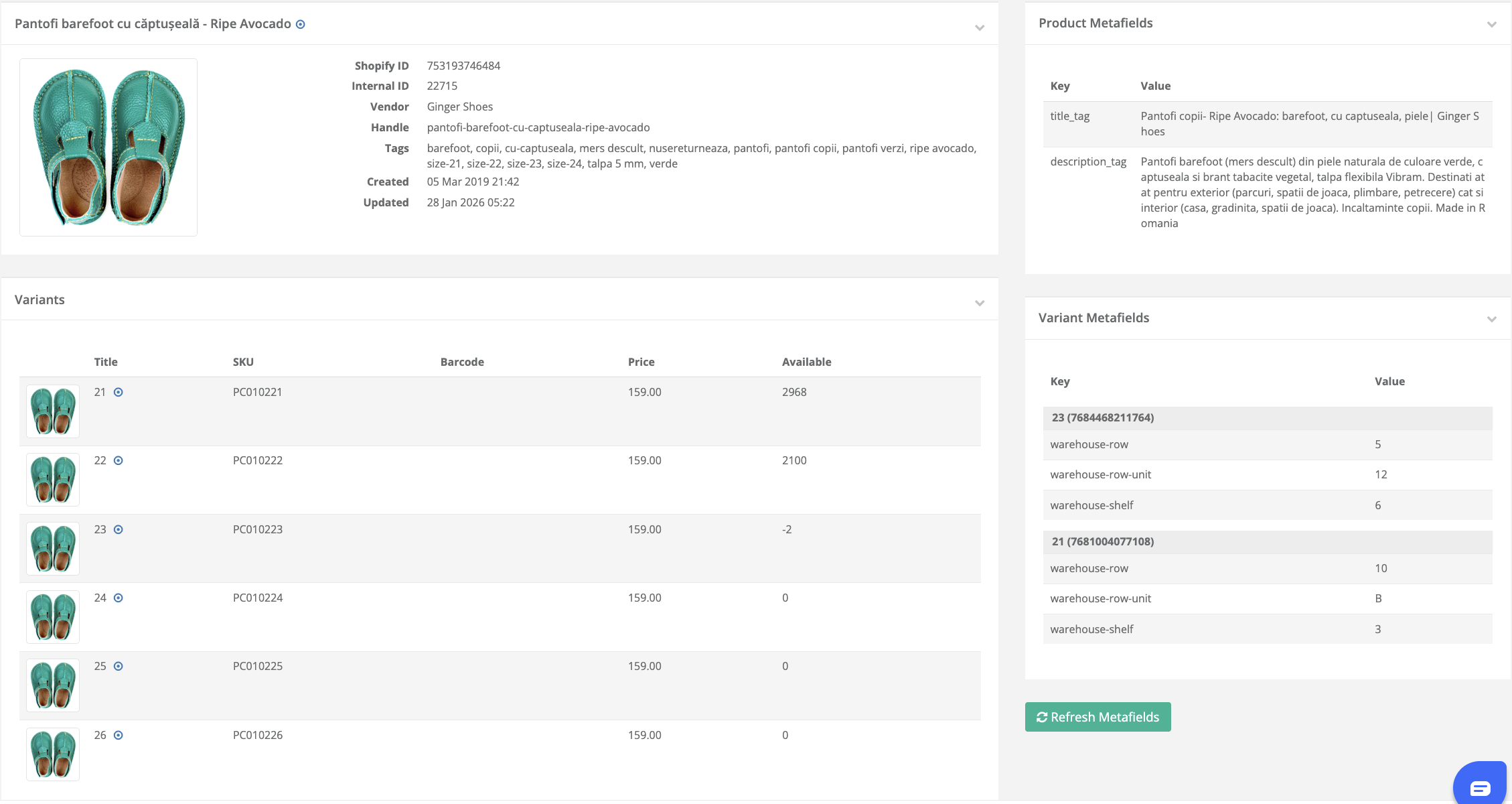
Starting February 15, xConnector provides a dedicated Product Details page for all products included in orders. This page displays product information directly retrieved from Shopify, allowing you to access complete product data without leaving xConnector.
Key Benefits
This feature simplifies daily operations by allowing you to:
- View product information without logging into Shopify
- Quickly verify product variants included in an order
- Access product images for visual confirmation
- Check product descriptions and tags
- View product and variant metafields (such as warehouse location, shelf, or internal attributes)
- Reduce time spent switching between systems
- Improve accuracy during fulfillment, picking, and support workflows
How to Access Product Details
You can access the Product Details page directly from the order view:
xConnector → Click on the Order → Click on the Product
This opens the Product Details page, where you can review all relevant product information.
Available Information
The Product Details page includes:
- Product image
- Product title and vendor
- Product description
- Product tags
- All product variants, including:
- SKU
- Price
- Available quantity
- Product metafields
- Variant metafields (for example: warehouse row, shelf, or unit location)
Refresh Metafields Button
The Refresh Metafields button allows you to manually reload metafields from Shopify.
This is useful when:
- A new metafield was recently added in Shopify
- A metafield value was updated
- You want to ensure the latest metafield data is available in xConnector immediately
Without using this button, new metafields will be automatically retrieved during the next product synchronization. The Refresh Metafields button allows you to fetch them instantly.
This provides a complete and centralized view of product data, helping warehouse staff, support teams, and administrators work more efficiently.
Was this article helpful?
That’s Great!
Thank you for your feedback
Sorry! We couldn't be helpful
Thank you for your feedback
Feedback sent
We appreciate your effort and will try to fix the article