Payment Due Later / Net Terms Support
TABLE OF CONTENTS
Overview
The Support for orders with payment due later option allows xConnector to correctly handle orders that use payment terms, such as Net 30, Net 15, or a fixed due date.
When this option is enabled, orders with payment terms are treated as payment due later orders. The customer is expected to pay by invoice, according to the payment due date, not at delivery.
As a result, the shipping label / AWB is generated with Cash on Delivery amount: 0
This prevents the courier from collecting payment from the customer when the package is delivered.
How to activate the option
The feature can be enabled in XConnector from:
xConnector → Profile → Preferences → Shipping & Invoicing → Support for orders with payment due later

How it works
If an order is created with payment terms, xConnector will detect that the payment is due later.
Even if the order still has an unpaid balance, the AWB / shipping label will be generated with COD = 0, because the order is not meant to be paid at delivery.
The customer will pay separately, by invoice, based on the payment terms configured on the order.
Important behavior
This feature applies only to orders that have payment terms assigned.
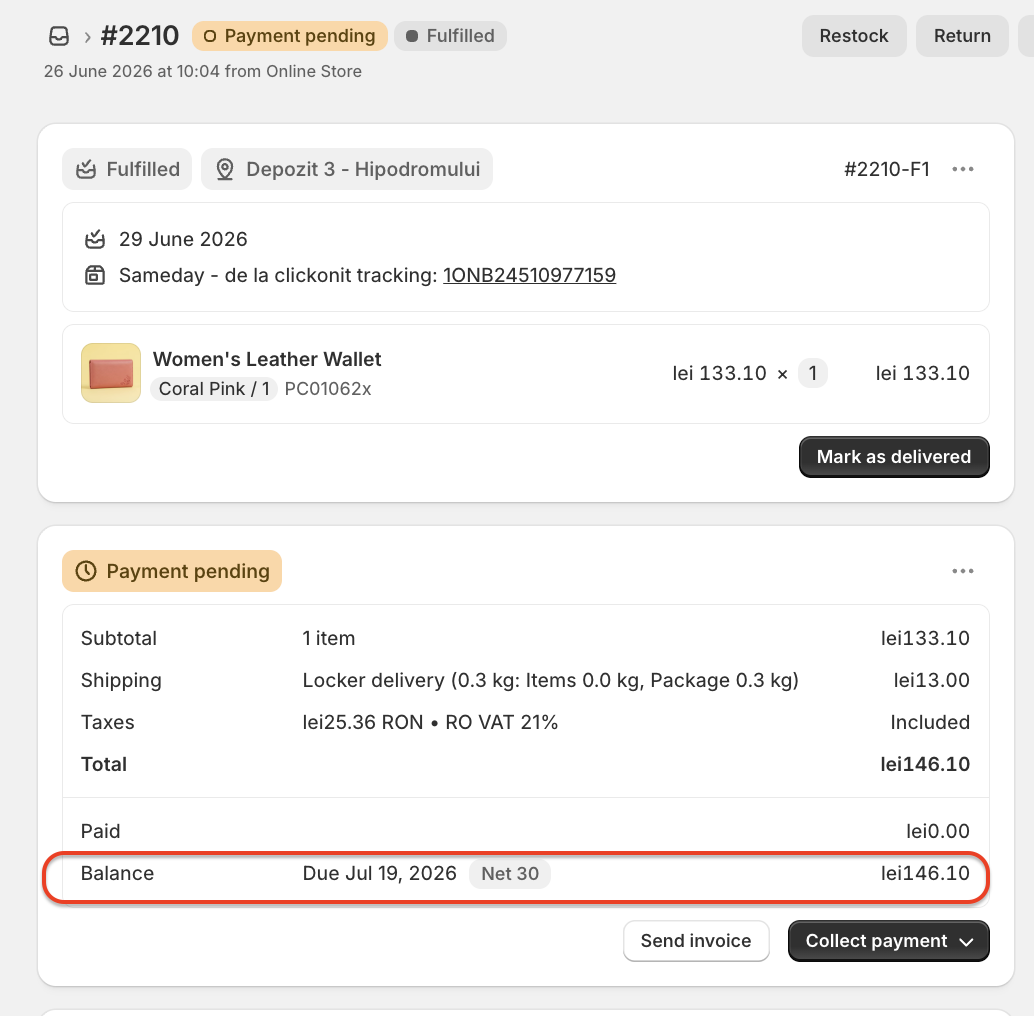
For example, if an order has:
Payment status: Payment pending
Payment terms: Net 30
Balance due: 146.10 lei
Due date: July 19, 2026
-> The shipping label will still be generated with Cash on Delivery: 0 lei
-> The courier will not collect the order amount on delivery.
Overdue payment terms
If the payment due date has already passed, the shipping label will still be generated with COD = 0.
This is because the payment terms are a property of the order. Once the order is marked as having payment due later, xConnector will continue to treat it as an invoice-based payment order, even if the due date is overdue.
The courier will still not collect payment for that order.
Notes
- Enabling this option does not mark the order as paid.
- It only controls how the COD amount is sent to the courier when generating the shipping label.
- Orders without payment terms are not affected by this setting and will follow the normal COD/payment rules configured in xConnector.
Contact
➡️ Need help with xConnector? We are just a message away:
Chat: click the blue chat icon (bottom-right)
E-mail: support@xconnector.app
Phone: +4 0373 747 991
➡️ Stay connected with xConnector:
Facebook group: https://www.facebook.com/groups/shopify.romania.xconnector
Facebook page: https://www.facebook.com/xConnectorApp
TikTok: https://www.tiktok.com/@xconnector.app
YouTube: https://www.youtube.com/@xconnector_app
Was this article helpful?
That’s Great!
Thank you for your feedback
Sorry! We couldn't be helpful
Thank you for your feedback
Feedback sent
We appreciate your effort and will try to fix the article