Release: xConnector 1.21.16 (September 28, 2026)
You can now limit the locker map to one or more countries. When the filter is set, your customers see only the pickup points (lockers and parcel shops) from the countries you choose: on the map, in the search and
in the quick list.
Why use it
Some couriers have pickup points in several countries. For example, GLS or Sameday have lockers in Romania, Hungary, Bulgaria and other countries. If you only deliver to some of them, the map can show many points
your customers can't actually use.
With the country filter:
- customers only see pickup points where you deliver;
- the map loads fewer points and is easier to browse;
- searching for a locker returns only relevant results.
How to set it up
Shopify → Settings → Checkout → Apps → click on the xConnector extension(s) , )(Thank you, Order status page or Checkout if you have Shopify Plus)
In the “Show lockers only in these countries” field, enter: the country code and click Save.
example:
- RO for Romania
- BG for Bulgaria
- HU for Hungary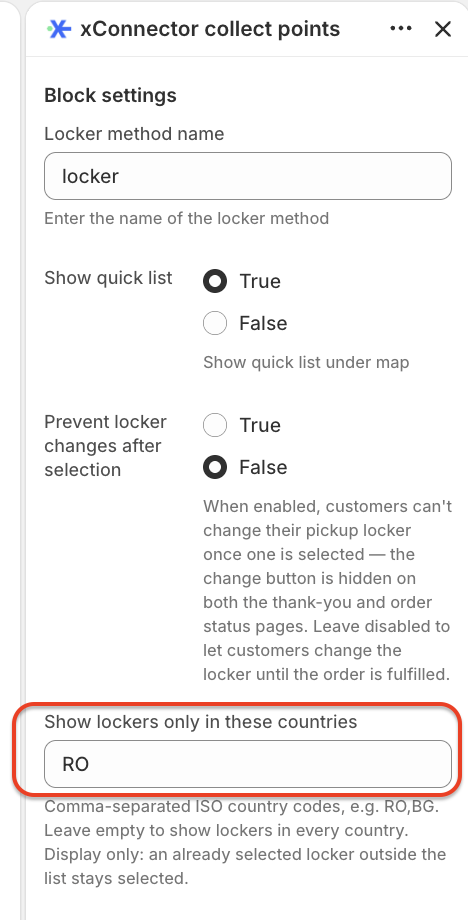
To show pickup points from all countries again, clear the selection.
Good to know
- Display only. The filter changes what is shown on the map. It does not change your courier settings, shipping rates or the couriers available at checkout.
- Existing selections are kept. If a customer selected a locker before you changed the filter, that selection stays valid, even if the locker is in a country you later excluded.
- Search is filtered too. When a customer searches by city or locker name, only results from the selected countries are shown.
- Accurate country data. Starting with release 1.21.16, every pickup point has a standard country code (RO, BG, HU, CZ…) set by its courier, so the filter works the same way for all couriers.
Was this article helpful?
That’s Great!
Thank you for your feedback
Sorry! We couldn't be helpful
Thank you for your feedback
Feedback sent
We appreciate your effort and will try to fix the article