Shipment Timeline and Tracking Information
xConnector provides a shipment timeline for each generated shipping label. This allows you to track the shipment status and review the fulfilment details directly from the order page.
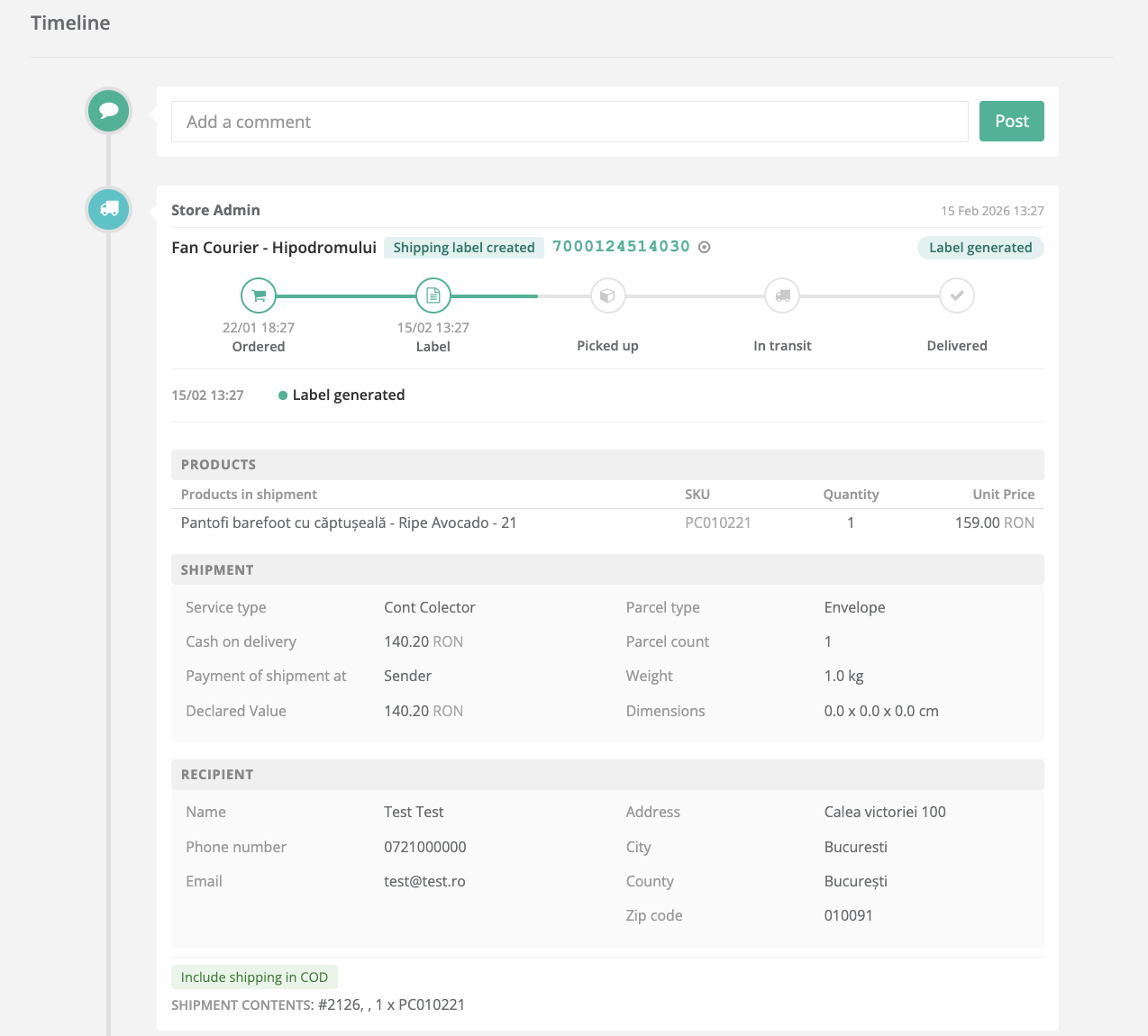
The shipment events and tracking information are available in the Timeline section of the order.
How to Access Shipment Timeline
To view shipment history and tracking information:
xConnector - Click on the order - Scroll to Timeline
The Timeline displays all shipment events in chronological order, including:
- Shipping label creation
- Pickup status
- In transit status
- Delivery status
- Courier tracking number (AWB)
- Shipment status progression
When a shipping label is generated, xConnector displays shipment information.
This allows you to quickly understand the current shipment status and history and quick identification of the shipment status without accessing the courier website.
Operational Advantages
The shipment timeline improves operational efficiency by:
- Providing full shipment history in one place
- Eliminating the need to manually search for tracking information
- Allowing support teams to quickly answer customer inquiries
- Helping warehouse teams monitor fulfillment progress
- Centralizing tracking and fulfillment data inside xConnector
Was this article helpful?
That’s Great!
Thank you for your feedback
Sorry! We couldn't be helpful
Thank you for your feedback
Feedback sent
We appreciate your effort and will try to fix the article