A situation that often appears when processing orders: shipping multiple parcels for the same order, and the difference between partial fulfillment and a complete shipment with multiple parcels.
There are two different scenarios:
1. Partial fulfillment – shipping only part of the products
This option is suitable when you want to ship only some of the products from an order.
Example: the order has 3 products, but today you only ship one of them.
How it works:
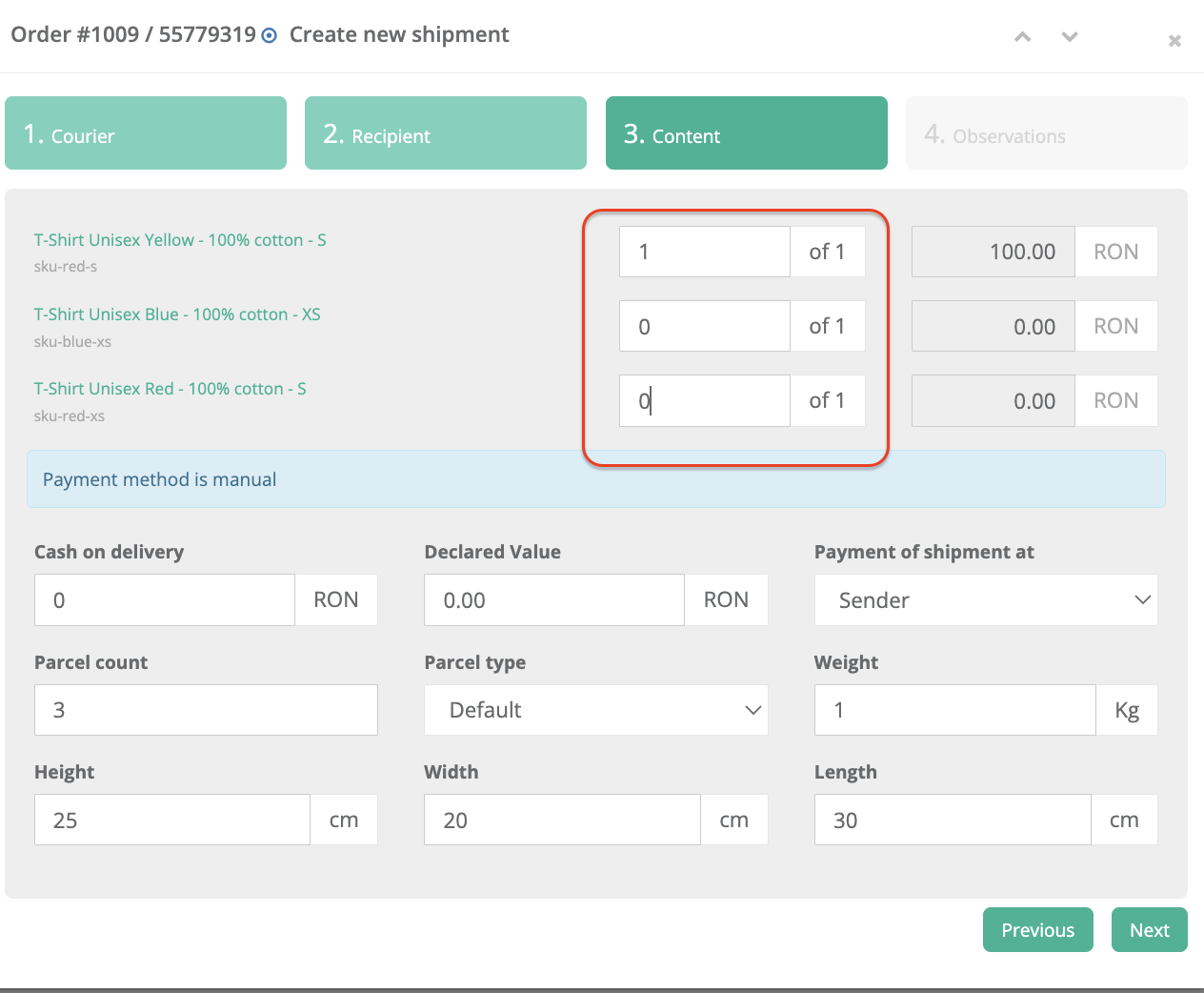
At the Content step, you set the desired quantity for each product.
Products that you do not want to ship now are left at 0.
The field displays the format X / Total, for example:
1/1 for the product included in the shipment
0/1 for the products that will be shipped later
A shipping label is generated only for the products with quantity greater than 0.
The remaining products can be shipped later, each with its own shipping label and tracking number.
This scenario is useful when:
- one product is available now and the others will follow later
- products are shipped from different warehouses
- you want to deliver the order in multiple steps
2. Complete shipment, but with multiple parcels
This option is suitable when you ship all products from the order at the same time, but they are packed in separate physical parcels.
Example: the order has 3 large products, each packed separately.
How it works:
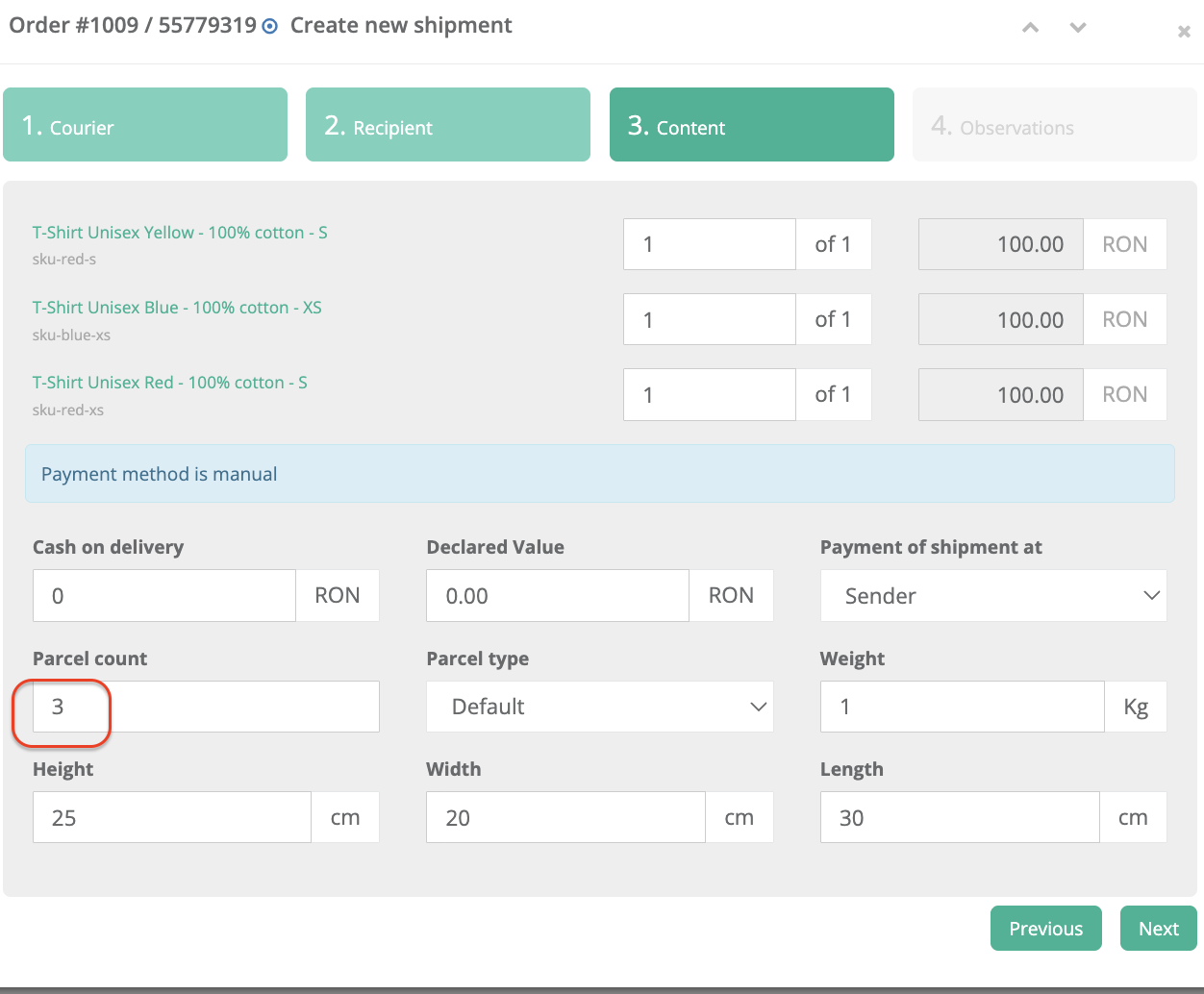
You set all products to the maximum available quantity, for example 1/1 for each product.
You change the Parcel count field to the number of physical parcels, for example 3.
You fill in the dimensions for one individual parcel: height, width and length in cm.
One single shipping label is generated, with parcel parts such as:
1/3, 2/3, 3/3
All parcels are linked to the same shipping label and the same tracking number.
The courier can scan each parcel individually and verify that all parcel parts have been delivered.
This scenario is useful when:
- all products are shipped together
- products are large or fragile
- each product needs to be packed individually
- you want one single shipping label, but multiple physical parcels
About the COD field
The Cash on delivery (COD) field defines the amount that the courier collects from the customer upon delivery.
You can set COD = 0 RON when:
- the customer paid online
- shipping is free
- shipping is covered by the store
- no amount needs to be collected at delivery
You can set a COD value when:
- the order is paid by cash on delivery
- you want the shipping cost to be collected by the courier
- the collected amount includes shipping and, optionally, the product value
I
Important: the COD field works the same in both scenarios. The difference is how the products are shipped: partially, with separate shipping labels, or completely, with one shipping label and multiple parcels.
In short:
Partial fulfillment = you ship only part of the products now, and the rest later, with separate shipping labels.
Multiple-parcel shipment = you ship all products now, but in separate physical parcels, under the same shipping label.
Contact
➡️ Need help with xConnector? We are just a message away:
Chat: click the blue chat icon (bottom-right)
E-mail: support@xconnector.app
Phone: +4 0373 747 991
➡️ Stay connected with xConnector:
Facebook group: https://www.facebook.com/groups/shopify.romania.xconnector
Facebook page: https://www.facebook.com/xConnectorApp
TikTok: https://www.tiktok.com/@xconnector.app
YouTube: https://www.youtube.com/@xconnector_app
Was this article helpful?
That’s Great!
Thank you for your feedback
Sorry! We couldn't be helpful
Thank you for your feedback
Feedback sent
We appreciate your effort and will try to fix the article